


We use Basecamp to manage all our ministry’s major projects, plan events, and manage some key processes. It’s an intuitive, simple online platform for a team to collaborate on projects, assign and track to-do’s, share and discuss files, and monitor progress. You can create templates for recurring events, projects, and processes and launch them when you’re ready to start planning or working. You can add any number of people to each specific project. You can set various levels of notifications by email. There’s an accompanying mobile app with push notifications. AND, using Zapier, you can integrate it with other web services like Google Calendars, Evernote, Google Docs, Dropbox, Gmail, etc.!
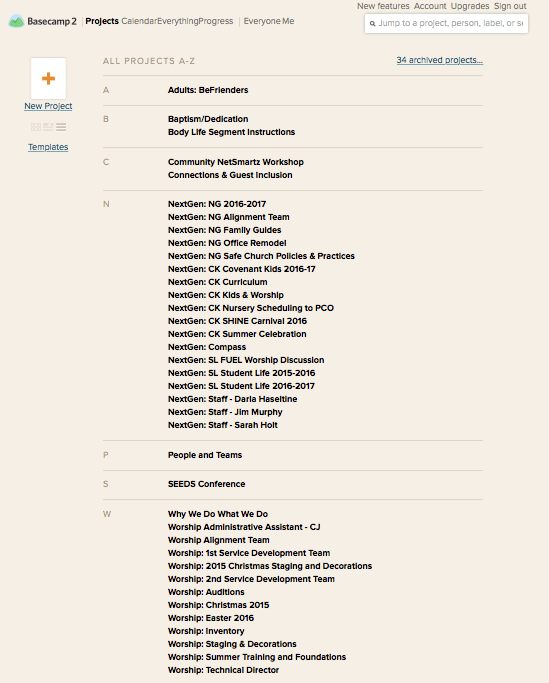

We use Basecamp in three primary ways.
Ministry Department by Year
We create a project for each ministry department (for those who want to use it anyway). These are then organized alphabetically by area of alignment. Each area of ministry has various categories of to-do’s and discussions tailored to their needs. I like to create a separate to-do list for each event or initiative.


Each to-do list is organized sequentially according to the calendar. Some to-do’s have a due-date. Some are assigned to people on the team. Some have embedded web links to the internal google form that must be completed for our office and facilities staff. Some have documents attached to them like recurring letters, brochures, and registration forms. Others are simply noting to launch another project by a certain date. These are for those events and projects that have multiple categories of to-do’s and require an entirely separate team of people.
Projects & Events
Some of our projects are just that…projects. That includes curriculum planning, environment remodeling, marketing or informational projects, etc. These are usually document-sharing heavy, with version tracking, and lots of discussions.

Some of our projects are special events with many of them recurring annually. Basecamp is great for creating templates that can hold to-do lists, supply lists, timelines, documents, forms, web links, role assignments, and so on. These templates can be launched any time you’re ready to start planning it. With a little extra work, you can also pre-program the template with to-do’s that automatically calculate their due dates by how many week’s out from the project’s launch date. You could even create a Zap (with Zapier) that lets an event on your Google Calendar trigger a set of to-dos in Basecamp. We haven’t tackled these last two options yet, but you can see the potential here!
Recurring Processes
The third primary way we use Basecamp is for templates of key processes like hiring new staff and all its guiding protocol, new staff orientations (to which we add the new staff and their supervisor) with all the important employment documents, areas of training, tutorial links, people to meet with, etc. Soon, we might begin using Basecamp for recurring processes like tracking guests and baptism/dedication candidates using Zapier to connect our Text-in-Church automated campaigns with Basecamp.
Basecamp has been a great tool for managing our projects, events, and processes effectively and efficiently. You should check it out.